
Tinker, Fabricate, Operate
From ideas to systems that work
Welcome. My name is Jason and Tinker, Fabricate, Operate is my freshly redesigned website for documenting my home lab infrastructure, self-hosting, cloud-hosting, automation, artificial intelligence, Home Assistant, robotics, 3D printing, and other cool and interesting projects I am working on.Home LabInfrastructure, self-hosting, networking, automation, and systems that keep the lab running. |
Maker Projects3D printing, robotics, electronics, Arduino, Raspberry Pi, and practical builds. |
AI and AutomationArtificial intelligence, n8n workflows, Home Assistant automations, and agent experiments. |
Latest Articles
News
Needle 3 Is a 29 MB Model That Runs Your Devices, Not Your Chat
- Posted October 22nd 2026, 10:12 PM
-
By Jason

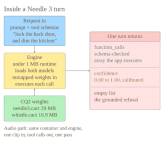
Needle 3, from Cactus Compute, is an Apache-licensed foundation model that ships as a single 8 to 29 MB file and runs entirely on phones, wearables, smart home hubs, robots, cars, and microcontroller-class boards. It gives up general chat on purpose: instead of writing prose, it reads your tool schemas, picks the function a request needs, fills the arguments, and returns a calibrated confidence score with every call, plus an empty list when nothing fits, so it refuses rather than guesses. This article walks through how the tool-calling loop works, why the confidence gating is the part worth stealing, how schema constraints become decode-time grammar guarantees, how the layer ladder and quick fine-tuning get a subnetwork onto small hardware, and where it honestly runs out of road. If you want a voice-controlled, offline assistant on a Raspberry Pi, a camera board, or a robot project, this is the closest thing to a practical entry point yet.
Filee Is a 244-Format Offline Converter That Lives in a Drag
- Posted October 22nd 2026, 7:12 PM
-
By Jason
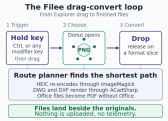
Filee, from developer Myeonggu Kim (KnifeLemon), is a free MIT-licensed desktop converter that turns the routine chore of file conversion into a single gesture: hold a key, drag your files from Explorer, and drop them on a donut of formats that appears at your cursor. It handles 244 formats across images, PDF, Office documents, e-books, video, audio, archives, CAD drawings, fonts and 3D models, works offline with nothing uploaded, plans multi-step conversion routes automatically, and needs no Office, Hancom Office or LibreOffice for the everyday cases. This article walks through how the donut actually works, which formats convert out of the box and which need an optional engine download, and how to bend the command line and watch folders into batch pipelines for maker work like STL, DWG, and raw camera files.